Version 0.1
MF Veil is Miss Flay’s Training Program that provides much needed relief to mind-broken sissies and femboys that just craves hypnosis every day. It is an unpacked browser extension for Chrome, that also works on Edge as well. The program will be available to all Patreon subscribers, and I’ll work on more functionalities as we go.
Functionality Demo
1. Unlock
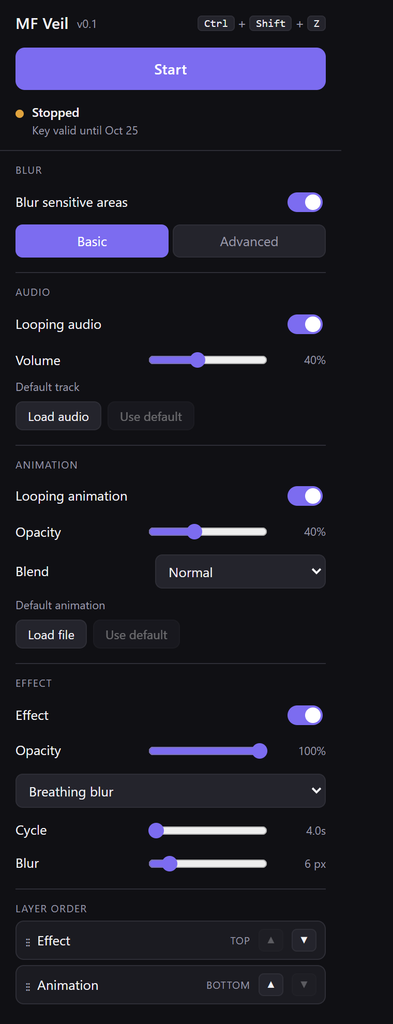
Unzip the files to a folder and go the Extensions page on your browser and check Developer Mode, which would allow Load Unpacked. Select the folder and after loading for the first time. You will be required to enter a monthly Key. The Key will be published every month to Patreon. You can just copy and paste into the box. When unlocked, there’s a text reminder to valid date.
2. Start and Stop
Nothing runs until you press Start. The default Start / Stop hotkey is Ctrl+Shift+Z and can be configured if you click on it.
Note: You may experience some lag starting for the first time after browser launch, or switching audio or video overlays. Once the audio/video file is loaded, restarting should not cause additional lag.
Status line below the button shows current status. Detector ready · GPU means blurring boxes should functional correct.
3. Blur
The Blur sensitive areas switch turns blurring on or off. Detected areas get a blurred box with a white outline.
Basic censors only female breasts and genitals.
Advanced censors butt, belly, armpit and feet in addition to basics.
Note: The identification is done by algorithms that doesn’t always identify every sensitive area. Some websites protects their videos from scanning and cannot be processed by the algorithm.
4. Audio
- Looping audio — on/off.
- Volume — 0–100%.
- Load audio — use your own audio file. Use default — go back to the built-in track.
5. Animation
A looping overlay stretched across the whole screen. It works in full screen as well.
- Looping animation — on/off.
- Opacity — 5–100%.
- Blend — how the animation mixes with the page: Normal (just lies over it), Screen, Overlay, Color dodge, Soft light, Hard light.
- Load file — use your own: WebP, WebM, GIF, or PNG (animated or still). Use default — go back to the built-in animation.
- Note: some video formats like MP4 do not support transparency. So the easiest way is to use a online converter to convert your animation to a supported type. Also if the video is too large, it may cause lag. It is recommended to just use a few seconds of a lopping animation.
6. Effect
One effect at a time, over the whole screen. More will be developed later.
- Effect — on/off.
- Opacity — 5–100%, how strong whichever effect you pick is.
- Dropdown — Breathing blur, Flash black or Flash white.
- Cycle — the speed of one full cycle. Breathing blur: 4–12 seconds. Flashes: 0.2–2 seconds.
- Blur (breathing blur) — how blurry it gets at its peak.
- Black time / White time (flashes) — how much of each cycle the screen is blacked or whited out.
WARNING: fast flashing can trigger seizures in people with photosensitive epilepsy. Do not use the flash effects if that applies to you or to anyone who may be looking at the screen.
7. Layer order
Which of Effect and Animation is drawn on top. Drag a row, or use its ▲ ▼ arrows. The top of the list is the top of the screen. The blur boxes always stay underneath both.